| data | ||
| scripts | ||
| vall_e | ||
| .gitignore | ||
| LICENSE | ||
| README.md | ||
| setup.py | ||
| vall-e.png | ||


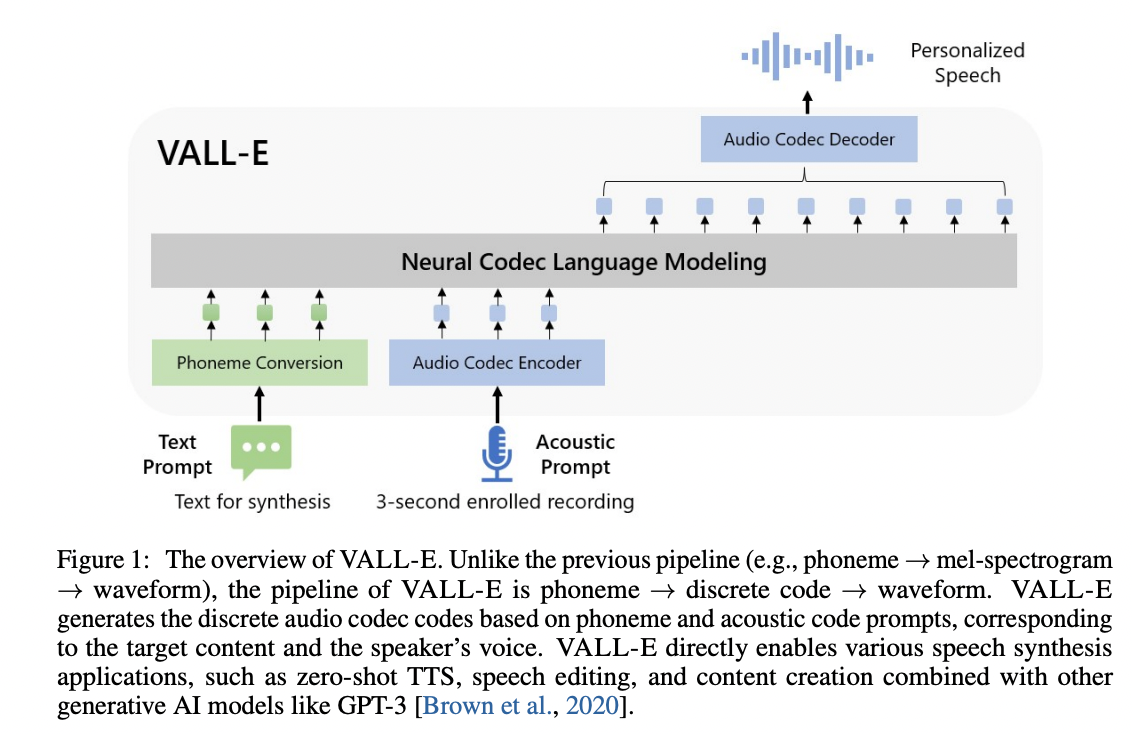
VALL'E
An unofficial PyTorch implementation of VALL-E, based on the EnCodec tokenizer.
Requirements
If your config YAML has the training backend set to deepspeed, you will need to have a GPU that DeepSpeed has developed and tested against, as well as a CUDA or ROCm compiler pre-installed to install this package.
Install
Simply run pip install git+https://git.ecker.tech/mrq/vall-e, or, you may clone by: git clone --recurse-submodules https://git.ecker.tech/mrq/vall-e.git
I've tested this repo under Python versions 3.10.9 and 3.11.3.
Try Me
To quickly try it out, you can choose between the following modes:
- AR only:
python -m vall_e.models.ar yaml="./data/config.yaml" - NAR only:
python -m vall_e.models.nar yaml="./data/config.yaml" - AR+NAR:
python -m vall_e.models.base yaml="./data/config.yaml"
Each model file has a barebones trainer and inference routine.
Pre-Trained Model
My pre-trained weights can be acquired from here.
For example:
git lfs clone --exclude "*.h5" https://huggingface.co/ecker/vall-e ./data/
python -m vall_e "The birch canoe slid on the smooth planks." "./path/to/an/utterance.wav" --out-path="./output.wav" yaml="./data/config.yaml"
Train
Training is very dependent on:
- the quality of your dataset.
- how much data you have.
- the bandwidth you quantized your audio to.
Notices
Modifying prom_levels, resp_levels, Or tasks For A Model
If you're wanting to increase the prom_levels for a given model, or increase the tasks levels a model accepts, you will need to export your weights and set train.load_state_dict to True in your configuration YAML.
Pre-Processed Dataset
Note
A pre-processed "libre" is being prepared. This contains only data from the LibriTTS and LibriLight datasets (and MUSAN for noise), and culled out any non-libre datasets.
Leverage Your Own Dataset
Note
It is highly recommended to utilize mrq/ai-voice-cloning with
--tts-backend="vall-e"to handle transcription and dataset preparations.
-
Put your data into a folder, e.g.
./data/custom. Audio files should be named with the suffix.wavand text files with.txt. -
Quantize the data:
python -m vall_e.emb.qnt ./data/custom -
Generate phonemes based on the text:
python -m vall_e.emb.g2p ./data/custom -
Customize your configuration and define the dataset by modifying
./data/config.yaml. Refer to./vall_e/config.pyfor details. If you want to choose between different model presets, check./vall_e/models/__init__.py.
If you're interested in creating an HDF5 copy of your dataset, simply invoke: python -m vall_e.data --action='hdf5' yaml='./data/config.yaml'
- Train the AR and NAR models using the following scripts:
python -m vall_e.train yaml=./data/config.yaml
You may quit your training any time by just typing quit in your CLI. The latest checkpoint will be automatically saved.
Dataset Formats
Two dataset formats are supported:
- the standard way:
- data is stored under
${speaker}/${id}.phn.txtand${speaker}/${id}.qnt.pt
- data is stored under
- using an HDF5 dataset:
- you can convert from the standard way with the following command:
python3 -m vall_e.data yaml="./path/to/your/config.yaml" - this will shove everything into a single HDF5 file and store some metadata alongside (for now, the symbol map generated, and text/audio lengths)
- be sure to also define
use_hdf5in your config YAML.
- you can convert from the standard way with the following command:
Export
Both trained models can be exported, but is only required if loading them on systems without DeepSpeed for inferencing (Windows systems). To export the models, run: python -m vall_e.export yaml=./data/config.yaml.
This will export the latest checkpoints under ./data/ckpt/ar-retnet-2/fp32.pth and ./data/ckpt/nar-retnet-2/fp32.pth to be loaded on any system with PyTorch.
Synthesis
To synthesize speech, invoke either (if exported the models): python -m vall_e <text> <ref_path> <out_path> --ar-ckpt ./models/ar.pt --nar-ckpt ./models/nar.pt or python -m vall_e <text> <ref_path> <out_path> yaml=<yaml_path>
Some additional flags you can pass are:
--max-ar-steps: maximum steps for inferencing through the AR model. Each second is 75 steps.--ar-temp: sampling temperature to use for the AR pass. During experimentation,0.95provides the most consistent output.--nar-temp: sampling temperature to use for the NAR pass. During experimentation,0.2provides the most clean output.--device: device to use (default:cuda, examples:cuda:0,cuda:1,cpu)
To-Do
- reduce load time for creating / preparing dataloaders.
- train and release a model.
- extend to multiple languages (VALL-E X) and
extend totrain SpeechX features.
Notice
- EnCodec is licensed under CC-BY-NC 4.0. If you use the code to generate audio quantization or perform decoding, it is important to adhere to the terms of their license.
Unless otherwise credited/noted, this repository is licensed under AGPLv3.
Citations
@article{wang2023neural,
  title={Neural Codec Language Models are Zero-Shot Text to Speech Synthesizers},
  author={Wang, Chengyi and Chen, Sanyuan and Wu, Yu and Zhang, Ziqiang and Zhou, Long and Liu, Shujie and Chen, Zhuo and Liu, Yanqing and Wang, Huaming and Li, Jinyu and others},
  journal={arXiv preprint arXiv:2301.02111},
  year={2023}
}
@article{defossez2022highfi,
  title={High Fidelity Neural Audio Compression},
  author={Défossez, Alexandre and Copet, Jade and Synnaeve, Gabriel and Adi, Yossi},
  journal={arXiv preprint arXiv:2210.13438},
  year={2022}
}